Here is the link to my Final Exam.
https://drive.google.com/file/d/0B-chhfVrP1CzNzhrOUFWaXpsM2c/edit?usp=sharing
Friday, June 27, 2014

Friday, June 20, 2014
My Prezi Concept Map
I chose to make my Prezi Concept Map about the next Children's Ministry Unit that we will be starting in a couple of weeks at my church. This unit is called, "Early Church". We will be spending 7 weeks on this topic, so I thought a Prezi Concept Map would be a great opportunity to have an overview of what we will be learning each week. The map will help us to see where we have been, and where we are going. I plan on using this map at the beginning of my lesson each week that I am serving. I may even go back and add more content in the future as I use the map week to week.
I purposely chose a template that showed "growth" rather than a hierarchical fashion. I wanted the students to be able to see that the church started with a small number of people, and has continued to grow and grow over the years.
There are a couple of videos to watch on this Prezi. The first is a clip from The Bible Series from the History Channel. This video is embedded right on the Prezi as a YouTube video. The second video can be watched by clicking on the link next to the circle with "The Work Continues". It is a video that was made by my church that shows some renovations that have been made inside of our church within the last few years. There is also a link to The Voice of the Martyrs website available on my Prezi.
I purposely chose a template that showed "growth" rather than a hierarchical fashion. I wanted the students to be able to see that the church started with a small number of people, and has continued to grow and grow over the years.
There are a couple of videos to watch on this Prezi. The first is a clip from The Bible Series from the History Channel. This video is embedded right on the Prezi as a YouTube video. The second video can be watched by clicking on the link next to the circle with "The Work Continues". It is a video that was made by my church that shows some renovations that have been made inside of our church within the last few years. There is also a link to The Voice of the Martyrs website available on my Prezi.
To view my Prezi please click - http://prezi.com/cq3iz-aerno7/?utm_campaign=share&utm_medium=copy
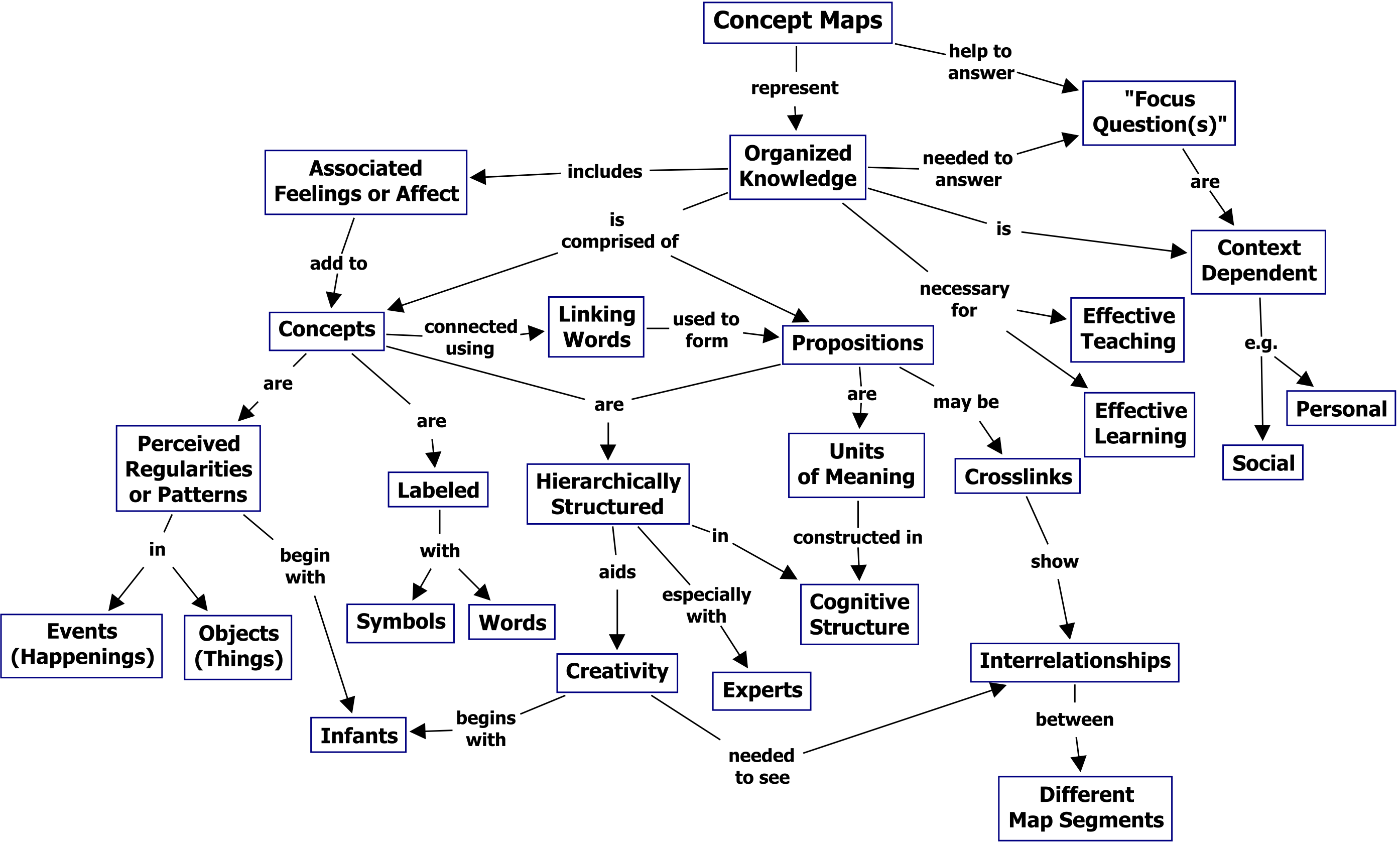
Example Concept Map
Here is a link to the example concept map.
http://cmap.ihmc.us/publications/researchpapers/theorycmaps/Fig1CmapAboutCmaps-large.png
http://cmap.ihmc.us/publications/researchpapers/theorycmaps/Fig1CmapAboutCmaps-large.png
Sunday, June 15, 2014
Overall Glog Review
This week I created a couple of “Glogs”. Glogs are like virtual posters that allow you to link videos, add sounds, insert images, and be very creative in presenting information. It is true that Glogs have the potential to create extensive cognitive load. As I looked at some example Glogs before creating my own, I definitely felt like some Glogs went over board with too much stimulation. I made deliberate effort to reduce the cognitive load in my Glog. One way I did this was by deleting things on the template that I chose that seemed like distractions. I also tried to pick a color scheme and not use too many colors on my Glogs, while at the same time keeping them interesting through the colors I did choose. Finally, I created one of my Glogs from scratch so that I got to pick and choose everything that was on the Glog from the very beginning. I do think that I succeeded in my efforts.
I think that Swisher and Mayer would not consider a Glog as one piece of multi-media, but rather they would view them as separate multi-media elements. The reason I feel this way is because when you click a link to watch a video or hear an audio recording, those are separate pieces of multi-media that have their own set of “rules” or “guildlines” that make it a good piece of multi-media. I think the template of your Glog is one piece of muilti-media by itself, then each piece that opens up in a new tab or window would be considered a different piece of multi-media.
I think it is true that, “It is entirely likely that almost every Glog ever made breaks all six of Mayer's multimedia principles.” As I looked back at my 500 word summary of the Swisher article and specifically the multimedia principles, none of them seemed to appy, or maybe only part of the principle would apply. The Multimedia principle – Talks about how important it is to use quality graphics as well as present both text and graphic at the same time to be most effective. In a Glog, this isn’t always the case. The Split-attention principle – Focuses on the idea of keeping important information together. Because of limited amount of space in cognitive load working memory information should be kept close together and not split apart in a presentation for example. In a Glog, you may have to click on a link to see some parts of the information, so it breaks this principle. The Temporal contiguity principle – Similar to the split-attention principle. This one focused on the idea of things happening successively in a presentation and having the information and images appear simultaneously during the narration of the presentation. There shouldn’t be too much time lapse of the information so that more meaningful connections can be made. Again, in a Glog, some time will go by as you are opening different links, or listening to different types of audio. The Modality principle – Using both visual and auditory channels to communicate a type of instructional material. The research showed that when both are happening there are better retention outcomes then when just one or the other is used. In a Glog, someone may choose not to do this, or may only use one channel in a certain aspect of their Glog.
The Redundancy principle – Too much information can make one “check out” and how the same information over and over can be too much. Information doesn’t need to be presented in multiple forms, which is a common assumption. In a Glog, there is purposely lots of information to catch the learners attention. Instead of “checking out” one feels drawn in, and want to click on many images to see what they “do”. The Coherence principle – One should leave out distractions and unnecessary items like irrelevant sounds or animation. It can be confusing and negatively effect learning. In a Glog, this could be true, but sometimes an extra element of surprise could be fun or engaging.
I agree that, “Even if a Glog breaks most of Mayer's multimedia principles it can still be used to facilitate a more complex understanding of topics than many other multimedia representations.” One reason I feel this way is because it can be a very interactive piece of media. There can be many uses of a Glog, as we saw on the online article, “40+ Ways to Innovative Teaching Using Glogster EDU.” Glogs are also “new” and “different” than many other pieces of multi-media that children are used to. When I used my Glog this morning as I taught in my Children’s Ministry classroom, none of the 13 5th and 6th graders had ever even heard of a Glog before. They were very interested in what it was, and were engaged.
I think this is another reason why they are so popular with teachers and students. They are fairly easy to create, and there are so many possiblilites of how to make them and how to use them.
I think that Swisher and Mayer would not consider a Glog as one piece of multi-media, but rather they would view them as separate multi-media elements. The reason I feel this way is because when you click a link to watch a video or hear an audio recording, those are separate pieces of multi-media that have their own set of “rules” or “guildlines” that make it a good piece of multi-media. I think the template of your Glog is one piece of muilti-media by itself, then each piece that opens up in a new tab or window would be considered a different piece of multi-media.
I think it is true that, “It is entirely likely that almost every Glog ever made breaks all six of Mayer's multimedia principles.” As I looked back at my 500 word summary of the Swisher article and specifically the multimedia principles, none of them seemed to appy, or maybe only part of the principle would apply. The Multimedia principle – Talks about how important it is to use quality graphics as well as present both text and graphic at the same time to be most effective. In a Glog, this isn’t always the case. The Split-attention principle – Focuses on the idea of keeping important information together. Because of limited amount of space in cognitive load working memory information should be kept close together and not split apart in a presentation for example. In a Glog, you may have to click on a link to see some parts of the information, so it breaks this principle. The Temporal contiguity principle – Similar to the split-attention principle. This one focused on the idea of things happening successively in a presentation and having the information and images appear simultaneously during the narration of the presentation. There shouldn’t be too much time lapse of the information so that more meaningful connections can be made. Again, in a Glog, some time will go by as you are opening different links, or listening to different types of audio. The Modality principle – Using both visual and auditory channels to communicate a type of instructional material. The research showed that when both are happening there are better retention outcomes then when just one or the other is used. In a Glog, someone may choose not to do this, or may only use one channel in a certain aspect of their Glog.
The Redundancy principle – Too much information can make one “check out” and how the same information over and over can be too much. Information doesn’t need to be presented in multiple forms, which is a common assumption. In a Glog, there is purposely lots of information to catch the learners attention. Instead of “checking out” one feels drawn in, and want to click on many images to see what they “do”. The Coherence principle – One should leave out distractions and unnecessary items like irrelevant sounds or animation. It can be confusing and negatively effect learning. In a Glog, this could be true, but sometimes an extra element of surprise could be fun or engaging.
I agree that, “Even if a Glog breaks most of Mayer's multimedia principles it can still be used to facilitate a more complex understanding of topics than many other multimedia representations.” One reason I feel this way is because it can be a very interactive piece of media. There can be many uses of a Glog, as we saw on the online article, “40+ Ways to Innovative Teaching Using Glogster EDU.” Glogs are also “new” and “different” than many other pieces of multi-media that children are used to. When I used my Glog this morning as I taught in my Children’s Ministry classroom, none of the 13 5th and 6th graders had ever even heard of a Glog before. They were very interested in what it was, and were engaged.
I think this is another reason why they are so popular with teachers and students. They are fairly easy to create, and there are so many possiblilites of how to make them and how to use them.
Friday, June 13, 2014
Children's Ministry Glog
The instructional activity that my second Glog is designed to facilitate is a Virtual Children's Ministry Worship Glog. This is similar to number 27, "Virtual Music Concert", from the website 40+ Ways to Innovative Teaching Using Glogster EDU. I have recorded myself singing and doing the motions to different worship songs. Some of the songs use sign language and dance as well. Currently, there are 4 girls in fifth and sixth grade that help lead worship in Children's Ministry at my church every other week. The songs are picked ahead of time and I record myself teaching the motions to the song. From there I email the girls the video and they have 2 weeks to memorize the song and motions before we meet to practice. Once the song is memorized, the girls get in front of a group of at least 50 children and THEY get to teach the song and motions to their peers. (ages 4-12) There is background information about how I go about choosing a song that you can listen to if you click the "play" button in the bottom left-hand corner of the Glog. I have also included 2 examples of what these videos look like, and you can simply click the "play" button on the video inside of the flower as well as the video inside of the hands also on the Glog. To learn more about Children's Ministry at our church, you can click on the words, "Grace Church" where it will take you to our church's webpage.
This Glog is a type of promotional Glog to encourage new fifth and sixth graders to get involved in Children's Ministry Worship at our church. There will be a new group of kids moving up this July, and I thought this Glog could be a cool way to virtually show them some of what we do on the Five6 Worship team.
Here is the second Glog I created on Glogster. This one is all original material... video, images, text, and audio.
http://weare1bt.edu.glogster.com/childrens-ministry-worship/
This Glog is a type of promotional Glog to encourage new fifth and sixth graders to get involved in Children's Ministry Worship at our church. There will be a new group of kids moving up this July, and I thought this Glog could be a cool way to virtually show them some of what we do on the Five6 Worship team.
Here is the second Glog I created on Glogster. This one is all original material... video, images, text, and audio.
http://weare1bt.edu.glogster.com/childrens-ministry-worship/
Parable of the Sower Glog
The instructional activity that my fist Glog is designed to facilitate is an Infographic. This is number 18 from the website 40+ Ways to Innovative Teaching Using Glogster EDU. According to this website, "Infographics are a beautiful way to display graphs, data, processes, and synthesized information." As I have mentioned before, I am not currently teaching in the classroom so I chose to make my Glogs in a Children's Ministry context. This weekend I am teaching on The Parable of the Sower from Matthew 13 in the Bible. I thought making an Infographic Glog about this Parable would be an interactive way to engage the kids and display information. There is a fun video to watch about the Parable if you click on the image of the hand sowing the seeds. I also have included four audio clips of myself explaining each of the soils in the Parable mentioned. A second video can be watched if you click on the plant that is growing fruit at the bottom of the Glog. This video shows a plant growing in good soil elapsed over time. I plan on using the Glog this Sunday to help the kids process the new information they will be learning about. I have a worksheet that will go along with the Glog where they have to fill in the blanks based off of some key information that they will hear from the Glog.
To see my first Glog created on Glogster, click on the link below.
http://weare1bt.edu.glogster.com/parable-of-the-sower
To see my first Glog created on Glogster, click on the link below.
http://weare1bt.edu.glogster.com/parable-of-the-sower
Sunday, June 8, 2014
Reflection on Instructional Video
So far this semester I have seen some of the ideas in the
Swisher article evolve in several ways.
One of the first projects that we did was to create a Photoshop
collage. There wasn’t any “movement” in
this collage but one still had to keep in mind the ideas of best uses of
multimedia. Next, we created a digital
story that used still images (with limited movement as photographs were zoomed
in on) and the use of incorporating an auditory stimulus as we did voice-over
recordings. People had the option to
also include text on their digital story as well (which I did not do because I
thought it would be a distraction).
Finally, we have completed our latest assignment of creating an
instructional video. Video differs from
the use of still images and digital storytelling as it takes multimedia to the
next level as you are the one recording the video and are not relying on still
images to tell a story. It also is
different as you also have live movement, not just still images (visual
channel) and sound (auditory channel) happening at the same time. It isn’t just still images, but it is actual
movement that is taking place. Again,
one has the option to include text to enhance learning in their instructional
video, which can be helpful in this context.
My video had some of the same principles from the Swisher
article that I have mentioned in previous assignments. The principles manifest themselves
differently though across the projects.
For example, The Modality Principle.
This theory basically says that students can learn better in a
multimedia message if the words are spoken rather than printed. The majority of my video did this, just like
in my digital story assignment.
According to this principle, there are some cases when text with spoken
words can be useful, like in a step-by-step procedure. This is why I chose to have some text appear
in my instructional video to help the learner better follow the
instructions.
Wednesday, June 4, 2014
2 Examples of Instructional Videos on Web
https://www.youtube.com/watch?v=WwRcjaH57P8
So this instructional video goes along with a new hobby of mine, scrap booking. I have enjoy scrap booking now that I have children and stay home with them. This was a great activity to do in the winter when I felt stuck at home. I also love to help plan Bridal showers or Baby showers and thought this video could come in handy when thinking about making decorations or thank you cards for such an occasion. There is a Bridal shower I am helping plan this summer, and I think I will use this bow-tying video to make some cards to set out on the food table. This video would be helpful for any person interested in scrap booking, specifically learning how to tie a perfect bow.
http://www.youtube.com/watch?v=-_nHPdXGxms
This instructional video could be used to help train people in my workplace... my home! My soon to be 3-year-old son decided to peel a bunch of paint off of a wall in our family room. I am planning on touching up the large spot soon, so I thought it could be helpful to look up a video on the best way to go about do this. I watched a couple videos, but this one seemed to be the most simple and get to the point. This video could be helpful for any other parents out there who have a similar situation on hand and want to learn how to touch up paint! I have several other spots in the house that I plan on touching up now that I will have the paint out.
So this instructional video goes along with a new hobby of mine, scrap booking. I have enjoy scrap booking now that I have children and stay home with them. This was a great activity to do in the winter when I felt stuck at home. I also love to help plan Bridal showers or Baby showers and thought this video could come in handy when thinking about making decorations or thank you cards for such an occasion. There is a Bridal shower I am helping plan this summer, and I think I will use this bow-tying video to make some cards to set out on the food table. This video would be helpful for any person interested in scrap booking, specifically learning how to tie a perfect bow.
http://www.youtube.com/watch?v=-_nHPdXGxms
This instructional video could be used to help train people in my workplace... my home! My soon to be 3-year-old son decided to peel a bunch of paint off of a wall in our family room. I am planning on touching up the large spot soon, so I thought it could be helpful to look up a video on the best way to go about do this. I watched a couple videos, but this one seemed to be the most simple and get to the point. This video could be helpful for any other parents out there who have a similar situation on hand and want to learn how to touch up paint! I have several other spots in the house that I plan on touching up now that I will have the paint out.
Tuesday, June 3, 2014
Sunday, June 1, 2014
Reflecting on Digital Storytelling for Teaching and Learning
One theory of multimedia from the Swisher article that applied
to my digital story project was The Modality Principle. This theory basically says that students can
learn better in a multimedia message if the words are spoken rather than
printed. This is exactly the format that
I used when making my digital story, “Queen Priscilla’s Journey”. I did not use any text on purpose to follow
the ideas in this principle. The theory
talks about how people have two separate information processing channels, one
for auditory and one for visual. If
there is spoken text and written text going on at the same time the learner can
potentially become overloaded. There are
some cases when text with spoken words can be useful, like in a step-by-step
procedure. In the instance of a digital
story like the one I created, this isn’t true and the ideas of The Modality
Principle remain.
Some ideas of The Coherence Principle from the Swisher article
also applied. According to Meyer, the
author of the article, “Student learning is hurt when interesting but irrelevant words and
pictures are added to a multimedia presentation.” I kept this statement in mind as I searched
for images and sounds to add to my digital story. As I played around on iMovie, I was tempted
to add sound effects that could have matched some of the pictures. When I tried it, it seemed to be more of a
distraction than anything else, which is exactly what The Coherence Principle
talks about, leaving out the potential distractions. In the end, I looked for images that clearly
made sense and kept the story moving, as well as music that matched the mood of
the story and was not distracting or confusing.
When thinking about
copyright and creative commons implications, I tried to make sure that images
were available for use through the CC laws.
For the last assignment I only used images from a website called
Morguefile.com. I did think my search
was limited last time, so for this project I also found some great free images
through freeimages.com. There was
actually a much larger selection than I even though on this website. There were a couple of images that I used from
someone’s Blog. I sent them a message
asking if it was okay for me to use their pictures for this project, since I
couldn’t find any CC listing anywhere on their webpage. Again, in an assignment like this I wondered
how you would give credit to photographers.
Would it be best to have a slide at the end of the digital story listing
where you found each image? Since the
majority of my images were through free websites I did not include such a slide
and it wasn’t clear through the directions for the digital story assignment.
Wednesday, May 28, 2014
Final Digital Story Video - "Queen Priscilla's Journey"
Hi, my name is Priscilla.
This is the story of my life; it’s a pretty amazing journey if you ask
me. My adventure begins when I was snatched away from my home.
I lived in a beautiful land called, the Royal Meadow. Oh, yeah… I forgot to mention something… I’m a princess. Before being separated from my parents, they
told me that I would be the Queen of everything I could see in the Royal
Meadow.
Luckily, whoever snatched me away, dropped me, but I was
still really far from home. I found
myself living in a strange new land, much different than I was used to.
I was scared, and far from home. I really missed my parents. I could only think about one thing… my
stomach! I was starving, and I couldn’t
get enough to eat. Luckily, the new
meadow had plenty of milkweed, my very favorite food to eat. After I gorged myself, I found a branch that
I could climb so that I could take a nice long nap. I was sleepy.
When I woke up, I found myself hanging upside down, and I
couldn’t move. “Hellllllllllp!” I
cried. And then I remembered something
else my parents had mentioned to me.
“Before you are Queen, your body will go through many changes. Do not be afraid, but embrace each stage and
trust God to do His good work in you.”
This memory brought me a lot of comfort, and I started to
relax. I remember Mom saying it was
called a Chrysalis. One morning I woke
up and something was different. I could
see through my Chrysalis. I took a deep
breath, and the Chrysalis tore open. My
body felt wet, and I longed to stretch out and move into a new position.
It had rained the night before, and there were fresh puddles
on the leaves where I caught a glimpse of my reflection. But was that really my reflection? Where had Priscilla gone? As I moved the refection moved. So I knew it was me. I stretched and I had a new sensation rush
through my body. I had wings! I was no longer a caterpillar princess, I was
a Queen. The orange and black pattern on
my wings was stunning. I now was an
elegant butterfly.
It was at that moment I knew what I was created for. I was made to fly. I took flight for the first time, as Queen
Priscilla and glided my way towards home.
As I moved my new wings up and down on that long journey
back home, I thought back on all I had been through. First being taken from the place that I knew,
growing, changing, and becoming the Queen that I now was. I was thankful that I had a place to go and
be with my family once again.
Tuesday, May 27, 2014
Digital Story Script #1
This is the story of my life, it’s a pretty amazing journey
if you ask me. Hi, my name is
Priscilla. Can you see me? You may have to look closely, way down there
on that leaf. I just came out of my egg
and am trying out my legs for the first time.
I live in a beautiful land where all kinds of creatures roam free
called, the Royal Meadow. Oh, yeah… I
forgot to mention something… I’m a
princess. Before my parents died, they
told me that one day I would be the Queen of everything I see in the Royal Meadow. I just don’t see how. I mean, I am so small, and the last time I
saw my refection on a leaf puddle I didn’t look like anything special.
Pause.
Becoming a Queen is too much for me to think about right now. Honestly, the only thing that’s on my mind is
lunch! I’m starving! Some people may call me a picky eater,
because I really only eat one thing.
Milkweed! Yuuuuuuuuuuum… I just
can’t get enough of this stuff.
Pause.
After I spent days gorging myself of milkweed I noticed I
had gained some weight. Also, I started
getting really sleepy. I decided to look
for a nice branch that I could take a long rest on. This is where things started getting
interesting. When I woke up, I found
myself hanging upside down and I couldn’t move!
“Helllllllllp!” I cried out. And then I remembered something else my
parents had mentioned to me… “Before you are Queen, your body will go through
many changes. Don’t be afraid, but
embrace each stage and trust God to do His good work in you.” This memory brought me a lot of comfort, and
I started to relax. I took a few deep
breaths, and started to actually enjoy the feeling of hanging there and decided
to let nature take over. Before I knew
it, I was completely covered in type of shell.
I then remembered overhearing my parents argue one day about the right
word for when this happens. Mom said it
was called a Chrysalis, day swore it was a Pupa. My uncle said he always heard it was called a
Cocoon. Despite the name difference,
they all agreed that this stage was to help them stay camouflaged and protected
from our enemies, as they got ready to take the throne.
Pause.
One morning, I woke up and something was different. I could see through my Cocoon. I took another deep breath and the Cocoon
tore open. My body felt wet and I longed
to stretch out and move into a new position.
It had rained the night before, and there were fresh puddles
on the leaves where I caught a glimpse of my reflection. But was that really MY reflection? Where
had Priscilla gone? As I moved, the reflection moved … so I knew it was
me. I stretched, and I had a new
sensation rush through my body. I had
wings! I was no longer a caterpillar
Princess... I was a Queen! The orange-and
black pattern on my wings was stunning.
I now l was an elegant Butterfly.
It was at that moment I knew what I was created for. I was made to fly! I took flight for the first time as Queen
Priscilla, and glided over the Royal Meadow.
I had come so far in my journey in life, and at the same time I felt
like my journey had only just begun!
Sunday, May 25, 2014
Reflecting on Digital Images in the Classroom
The theory of multimedia from the Swisher article that was
most relevant to my digital image projects was the Multimedia principle. This principle talks about how
important it is to use quality graphics as well as present both text and
graphic at the same time to be most effective.
When creating my collage I definitely looked for images that were of
high quality and that caught my attention.
I also made sure to use some text on this collage to further peak the
interest of the viewer and to be the most effective.
Upon reflection, I might have done some
things differently with the use of digital images based on your re-reading of
the Swisher article. I honestly
had forgotten some of the good tips and proven research that was made available
in the article. One principle that would
have been helpful to incorporate in my GIF is the Modality principle where you
use both visual and auditory channels to communicate a type of instructional material.
The research showed that when both are happening there are better retention
outcomes then when just one or the other is used. I hadn’t thought about that, and it could
have been neat to explore options to make sound available in a GIF or even the
collage. I don’t know if I could have
figured it out at this point, as all of the work on Photoshop was new for me to
navigate.
When thinking
about copyright and creative commons implications, I definitely made an effort
to make sure that images were available for use through the CC laws. I ended up using all of my images for the
collage through a website called Morguefile.com. I know that these images are all safe to use,
and chose to go that route to make sure I was above reproach when it came to
finding images to use that were fair game.
It may have limited my search a little bit as I reflect on that decision. In the future I will seek out other safe
websites like freeimages.com to look for other options. One thing I wasn’t sure about in these
assignments was how to give credit to the photographer. Perhaps that is something that should have
been listed at the bottom of the description of the assignment? Again, this didn’t cross my mind until now
after re-reading about copyright and the CC articles.
Friday, May 23, 2014
A Thousand Words about Jesus

The Children’s Ministry curriculum we are using at my church is called, The Story of Grace. It is an in-house made curriculum that covers main stories in the Bible in sequential order ranging from Genesis to Revelation. For my collage I chose to focus on the subject area of the Unit on Jesus, which is a part of The Story of Grace curriculum that we are currently in. This unit is 11 weeks long and focuses on the life, death, and resurrection of Jesus Christ. I chose several images that go along with the main text of each week. Two images I chose were a dove and some water. I chose these images to remind the kids about the first week in this Unit where we talked about Jesus being baptized. The water can also be a reminder of the miracle when Jesus walks on water. I chose the image of the lamb to remind the kids about the weeks where we talked about Jesus beginning His ministry and calling His disciples. He called Himself, “The good Shepherd” and often referred to his followers as His sheep that know His voice. Jesus often spoke in parables, so I chose the picture of the plant growing up out of the rocky soil to remind the kids about this parable from Matthew 13 where Jesus talks about what was sown on good soil, this is the one who hears the word and understands it and he indeed bears fruit. The plant also hints at the new life that we are given when we receive Christ. There is an image of the Bible, which is where we learn about who Jesus is in the first place. Through God’s Word (The Bible), He promises His Holy Spirit. There is an image of the cross to emphasize that Jesus came to be crucified on a cross for us! He came to pay the penalty for our sin and to make us right with God so that we can be with Him for all eternity. Finally, there is an image of an eye. If you look closely you can see that there is a small picture of part of the world inside of the eye. Before Jesus ascended back to Heaven, he left His disciples with the great commission to,
“Go therefore and make disciples of all nations, baptizing them in the name of the Father and of the Son and of the Holy Spirit…” (Matthew 28:19).
This collage will enhance my teaching in my Five6 classroom (5th and 6th graders at my Church). I will be able to show this image at the beginning of my lesson and ask the kids what they recognize that we have talked about so far. There are also images that go along with weeks in the Unit that we have not talked about yet. I will be able to use this collage in the future as we discuss the new topics about the Jesus Unit. I think I will use the collage image for the remainder of my lessons in this Unit, as a review and introduction to the next topic. I don’t plan on telling the kids exactly why I chose the images I did at first. I want to ask them what the image had/has to do with the topics that we are covering in the Unit. It will be a good opportunity for them to reflect back, and think about why each image was chosen.
Subscribe to:
Comments (Atom)